
This tutorial will guide you through setting up the hourly rate calculation method for tutors in the Flowclass system, and explain the salary statistics screen and export functions in the tutor account.
🧭 I. Setting Tutor Hourly Rates #
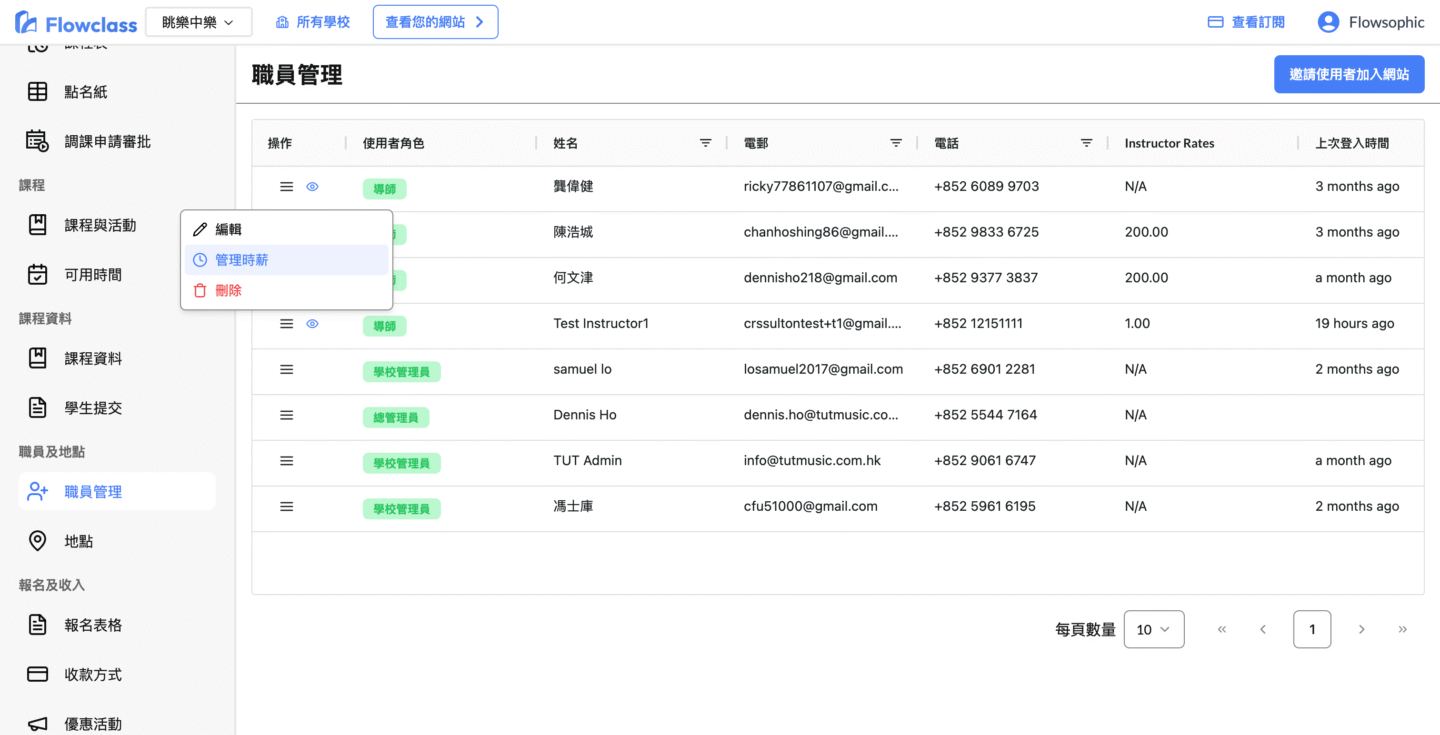
Go to “Staff Management” in the left navigation bar, click “⋮”> next to the tutor to manage hourly rates.
Main Setting Items Explanation #
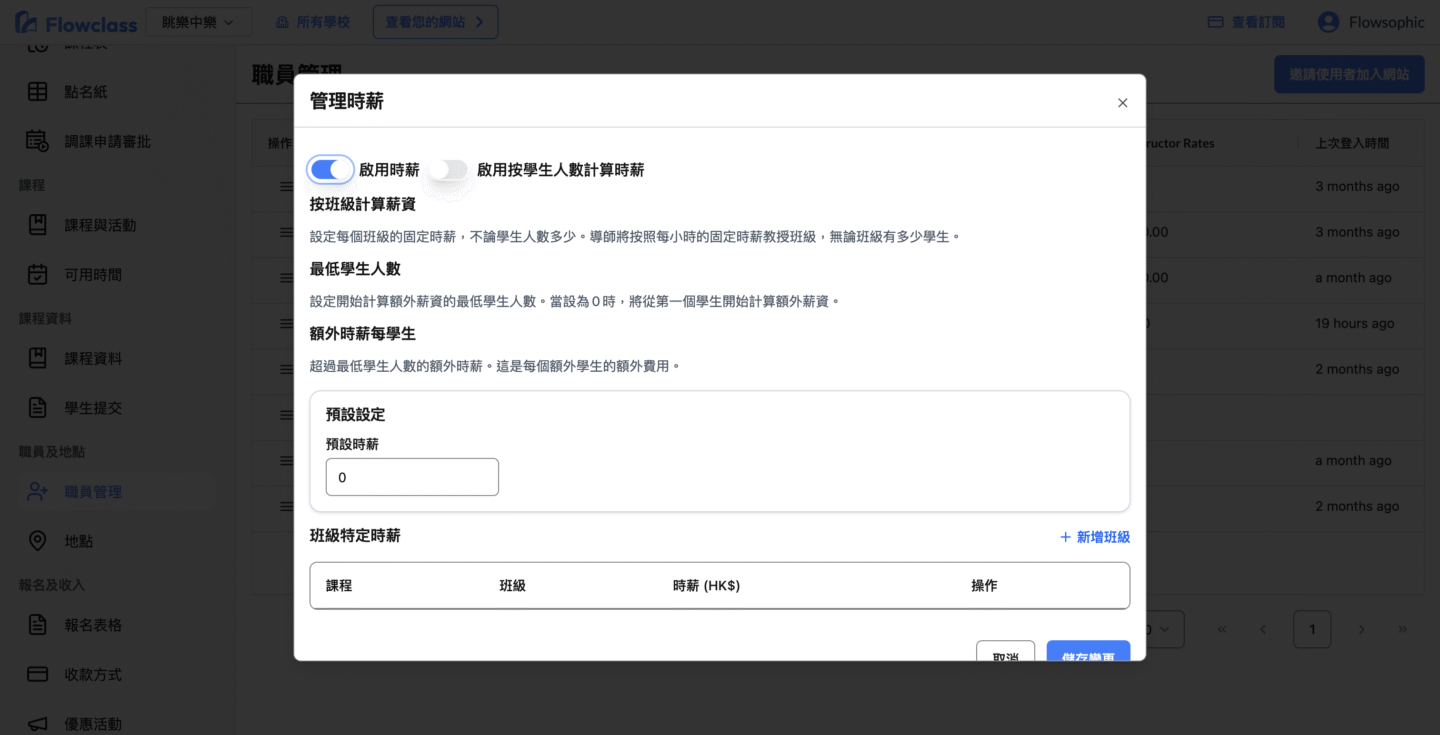
🟦 1. Enable Hourly Rate #
- Toggle the tutor salary function.
- When enabled, the system will automatically calculate salary based on class hours, student numbers, and set rules.
🟦 2. Calculation Mode #
There are two options available:
- Calculate by Class:
Fixed hourly rate per class, regardless of student count.
Suitable for individual or class-based courses. - Calculate by Student Count:
Salary varies with student numbers, suitable for small group or team classes.
🟦 3. Default Hourly Rate (Fallback Hourly Rate) #
This is the tutor’s basic teaching hourly rate (in HKD).
This amount applies to all classes without specific settings.
Example:
With a default rate of HK$400/hr, tutors earn HK$400 for classes without specified rates.
🟦 4. Minimum Student Count #
Sets the minimum number of students required before calculating additional salary.
Example:
- Minimum student count = 1
→ Salary starts from the first student. - Minimum student count = 3
→ Fixed hourly rate starts when there are at least 3 students.
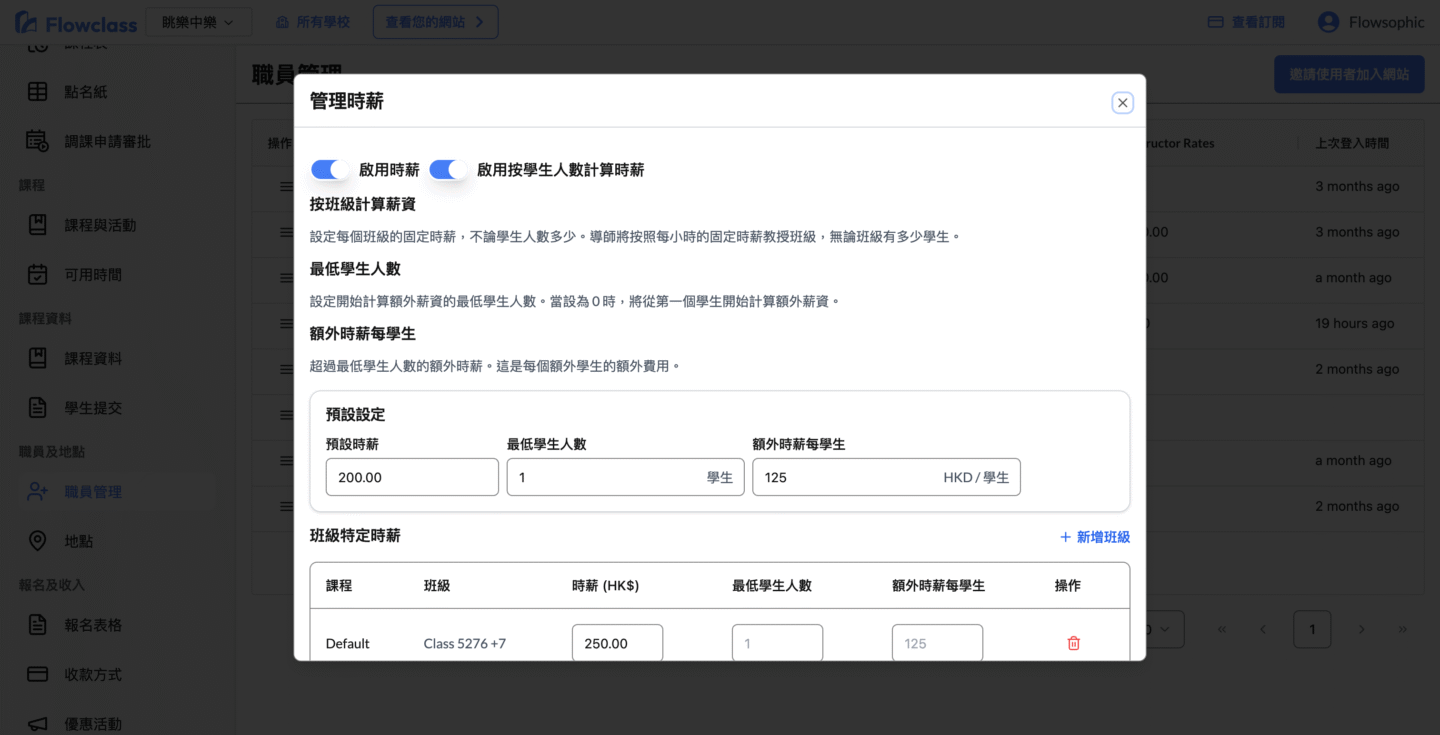
🟦 5. Additional Hourly Rate per Student #
The additional amount added for each student above the “Minimum Student Count”.
Example:
- Default rate: HK$400
- Minimum student count: 2
- Additional per student: HK$200
For a class with 4 students:
400(base) + 200×(4−2) = HK$800 /hr
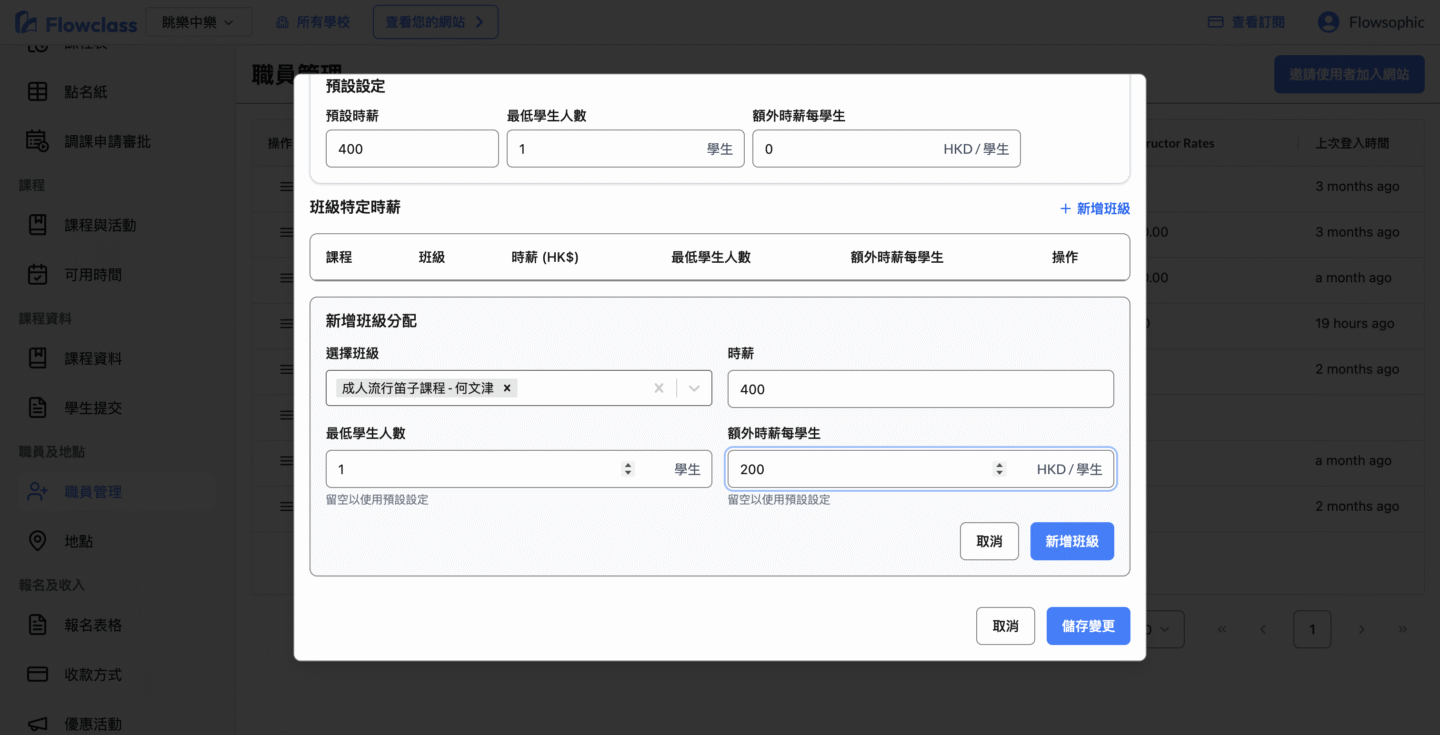
🟦 6. Class-specific Hourly Rates #
Individual rates can be set for different courses or classes.
For example:
| Course Name | Minimum Student Count | Additional Rate per Student | Total Hourly Rate Example |
|---|---|---|---|
| Adult Popular Flute Class | 1 | $200 / student | 1 person: $400 → 2 people: $600 → 3 people: $800 |
Click “Add Class” button to add individual settings.

✅ Settings Overview Example #
| Item | Setting Value | Meaning |
|---|---|---|
| Default Hourly Rate | HK$400 | Basic salary per class |
| Minimum Student Count | 1 | Calculation starts from first student |
| Additional Rate per Student | HK$200 | Additional 200 per extra student |
| Adult Popular Flute Course | 400/hr + 200 per student | Custom rules for specific courses |
Calculation example:
For flute class with 3 students, salary = 400 + (3−1)×200 = HK$800
💼 II. Tutor Salary Calculation Screen (Tutor Account) #
After logging into the system, tutors can view their salary report on the “User Profile” page, as shown below.
Screen Function Description #
🔹 Time Range Filter #
Set query range using the date selector (e.g., October 30, 2024 – October 30, 2025).
🔹 Course and Location Filter #
- Select Course: Show salary records for specified courses only.
- Filter by Location: Filter classes by specific campus.
🔹 Statistical Summary #
Shows at the top:
- Number of Classes Assigned (e.g., 40 classes total)
- Total Student Count (e.g., 0 or quantity statistics)
- Total Salary Amount (e.g., HK$8,000)
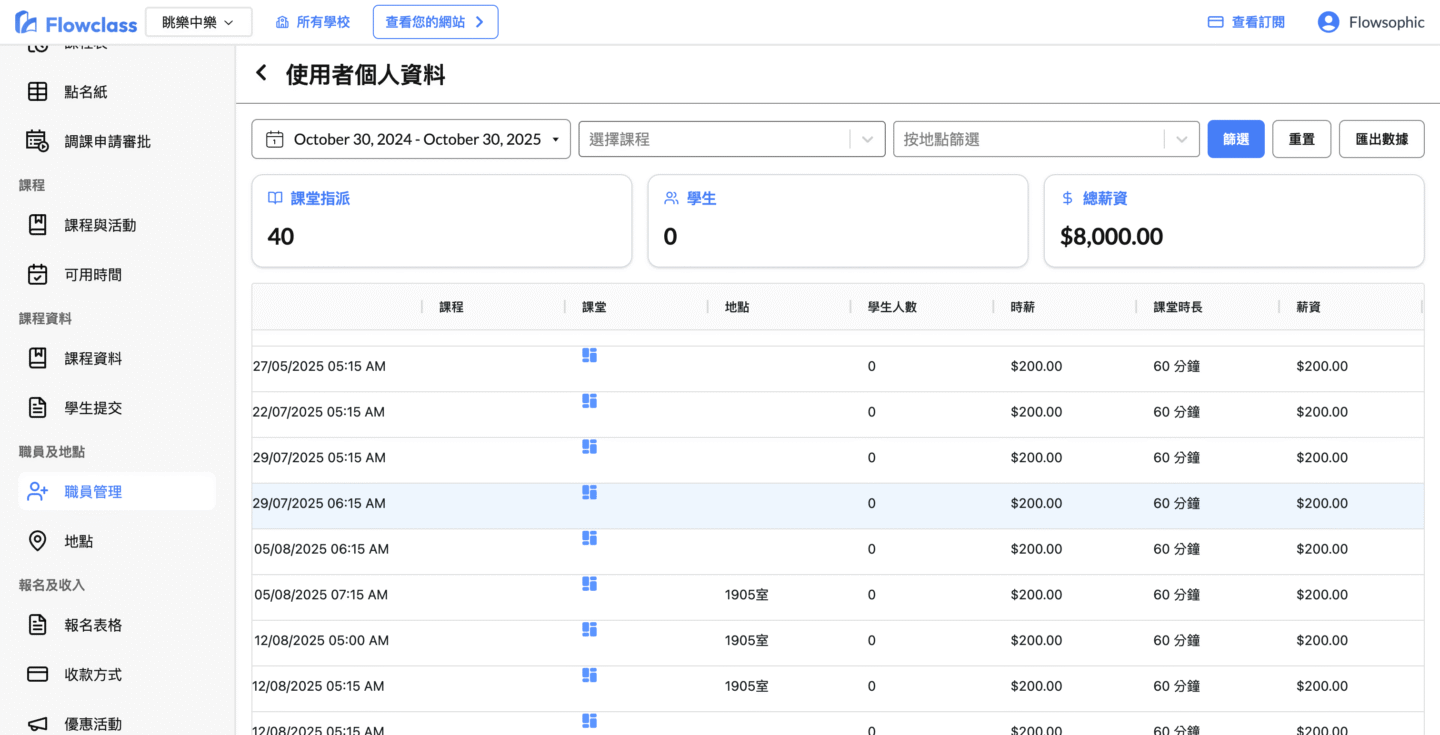
🔹 Detailed Table #
Each row represents one teaching record, showing these columns:
| Column | Description |
|---|---|
| Date | Actual class time |
| Course Name | Course taught by tutor |
| Location | Campus or venue where class is held |
| Student Count | Total number of students who attended |
| Hourly Rate | Automatically applied based on settings |
| Class Duration | e.g., 60 minutes |
| Salary | Automatically calculated compensation for the class |
📤 Data Export Function #
Click the “Export Data” button in the top right corner to export all displayed results to Excel for:
- Internal accounting settlement
- Salary payment record keeping
- Tutor account verification
🧾 Summary #
| Function | Purpose |
|---|---|
| Manage Hourly Rate Settings | Set base and additional hourly rate rules for tutors |
| Class-specific Rates | Allow different salary structures for different courses |
| Salary Dashboard | Provides tutors with hourly rate, class, and income statistics |
| Filter and Export | Convenient search for specific course and period income, supports report export |
Through this feature combination, administrators can flexibly set tutor compensation, while tutors can clearly understand their salary calculation method and total income for each class, achieving a transparent and automated salary management process.


